
Beginner’s Guide to Negative Keywords in Google Ads
You've been running your search ads for months now and you've seen some decent results.
Traffic and leads are coming in, which is great! But you've also noticed that your cost per click keeps climbing higher and higher.
Your ad spend is starting to outweigh your profits. As an entrepreneur, your time is precious and profits even more so.
While most marketers focus heavily on choosing the right keywords to target, it's equally important to consider the flip side: negative keywords.
With just a little tweaking of your negatives, you could significantly lower your cost per click and increase your profits all without having to spend hours reworking your campaigns.
In this ultimate guide, you’re going to break down exactly what negative keywords are and why they're so powerful.
Understanding Negative Keywords
Negative keywords are specific words or phrases that you intentionally exclude from your Google Ads campaigns.
By doing so, you prevent your ads from being shown to users who enter these terms in their search queries.
Utilizing negative keywords ensures that your ads reach a more relevant, highly-targeted audience, ultimately saving you time and money.
As a result, your ad budget is spent more effectively, as clicks come from users who are genuinely interested in your product or service.
Implementing a well-researched list of negative keywords can significantly improve your campaign's overall performance. It leads to:
Lower costs: By filtering out unproductive clicks, you minimize irrelevant traffic, ultimately lowering your ad spend.
Improved ad relevance: Your ads are displayed to potential customers genuinely interested in what you offer, thereby boosting their relevance.
Higher conversion rates: As your ads predominantly target users with the highest potential to convert, you can expect an overall improvement in conversion rates.
Negative keywords play a significant role in your Google Ads strategy.
By managing them effectively, you help the algorithm prioritize which search queries trigger—or do not trigger—your ads.
This significantly enhances ad targeting, resulting in more productive ad placement.
To use negative keywords in Google Ads:
Identify: Evaluate the search terms report to determine irrelevant keywords causing unprofitable clicks.
Create: Add the identified keywords as negative keywords, ensuring they are properly formatted.
Monitor: Regularly review your search terms report for new irrelevant keywords and adjust your negative keywords list accordingly.
There are three primary types of negative keywords that you can utilize in your Google Ads campaigns:
Broad Match
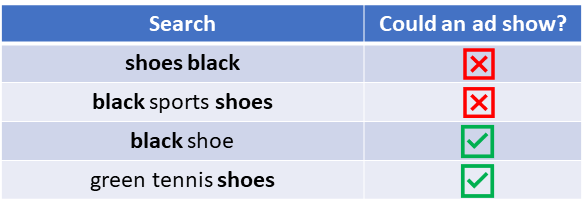
When using a broad match negative keyword, your ad is blocked if all the words in the negative keyword appear in the search query, regardless of their order.
For instance, if you include "black shoes" as a negative keyword, searches like "shoes black" and "black sports shoes" won't trigger your ad.
Phrase Match
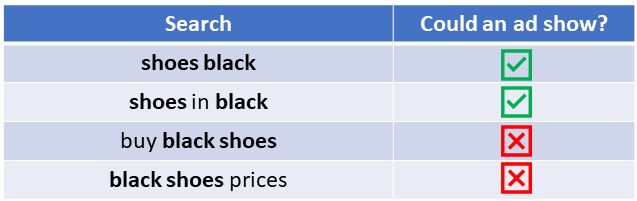
A phrase match negative keyword prevents your ad from showing if the search query includes the exact phrase, in the same order.
For example, when using "black shoes" as a phrase match, your ad will not be displayed for searches like "buy black shoes" but may appear for "shoes in black."
Exact Match
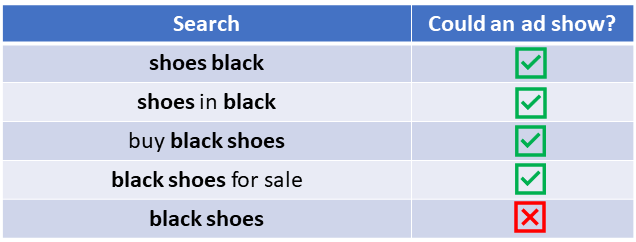
Your ad is blocked if the search query is entirely the same as the negative keyword.
By using "black shoes" as an exact match negative keyword, your ad won't be displayed in searches for that exact term, but can still appear for terms like "black shoes for sale."
Ultimately, selecting the proper negative keyword types and integrating them into your Google Ads strategy, can significantly improve your ad placement, ad targeting, and overall campaign effectiveness.
Adding Negative Keywords
To enhance the efficiency of your Google Ads campaigns, it's essential to add negative keywords.
To do this, follow these steps:
1. Access your Google Ads account: Sign in to your account and navigate to the "Keywords" tab.
2. Select "Negative Keywords": Within the "Keywords" tab, click on "Negative Keywords" to access the section dedicated to adding and managing negative keywords.
3. Choose campaign or ad group: Decide whether you wish to add the negative keyword to a specific campaign or ad group.
4. Add your keywords: Type or paste your chosen negative keywords in the provided field. Remember to include all match types (exact match and phrase match) you want to block.
Keep in mind that adding negative keywords will help you filter out irrelevant search terms, ultimately saving your budget and directing your ads to your target audience.
Best Practices for Selection
Selecting the right negative keywords requires a strategic approach. Here are some best practices for effective negative keyword selection:
Regularly review search terms reports: Analyze the search terms triggering your ads and identify irrelevant terms that might be costing you unnecessary clicks. Add these as negative keywords.
Consider match types: Be cautious with the match types you use for your negative keywords. For instance, an exact match negative keyword will only exclude that exact word or phrase, while a phrase match will exclude the entire phrase or close variations.
Group-related terms: Create a list of negative keywords that are relevant to your campaign or ad group, and apply it across multiple campaigns or ad groups if necessary.
Stay up-to-date with industry trends: Keep an eye on trends and popular search terms in your industry that might not be applicable to your business.
Incorporating these best practices while implementing negative keywords in your
Impact of Negative Keywords
on Ad Performance
Negative keywords play a crucial role in optimizing your Google Ads performance.
By incorporating them, you can efficiently control your ad placement and ensure your ads are shown to the most relevant audience.
In this section, we will explore the impact that negative keywords have on ad performance.
In digital advertising, it is essential to reach the right people at the right time.
When you add negative keywords to your campaign, you're effectively excluding search terms that are unrelated to your products or services.
This helps in refining your target audience, ensuring that your ad only appears when it is likely to be relevant.
You can reduce wasted ad spend and enhance both click-through rates (CTRs) and conversion rates.
Google Ads uses a metric called Quality Score to evaluate the relevance and quality of your ads. Your Quality Score determines your ad position and cost-per-click (CPC).
By utilizing negative keywords, you can minimize irrelevant impressions. As a result, your ad becomes more relevant, ultimately leading to higher Quality Scores.
A higher Quality Score tends to result in better ad placement and lower CPCs.
Negative keywords have a direct impact on your Return on Investment (ROI). By filtering out keywords that don't align with your target audience or offer, you can:
Decrease costs: You'll save money on bids for unrelated or low-converting keywords.
Increase revenue: With more relevant ads, your campaign will generate higher conversion rates.
These combined benefits contribute to maximizing your overall budget and improving your ROI.
To make the most out of negative keywords, keep their impact on your ad performance in mind.
By refining your target audience, improving your Quality Score, and maximizing your budget and ROI, you'll be able to optimize your Google Ads campaign effectively.
Conclusion
As you've seen, negative keywords are an essential part of setting up campaigns for Google Ads.
They allow advertisers to target only those customers interested in their particular goods and services as well as save money by not wasting time and clicks on ads that will never lead to conversions.
However, it's also important to remember that understanding the basics of negative keyword implementation is just the first step.
Maintaining and refining a list of relevant negative keywords should become a regular part of your routine so that you can optimize performance and maximize engagement with potential customers.
Utilizing negative keyword lists also helps you ensure that your budget isn't being wasted on ads with low relevance and competitiveness.
It's clear: by developing an expert understanding of implementing, maintaining, and utilizing negative keywords in campaigns, you can give yourself a significant advantage against your competition.
Click the link below to learn more about Google Ads so you can start growing your business.
SHARE


Subscribe now
Sign up for our newsletter to get the most interesting stories of the day straight to your inbox before everyone else
Privacy policy • Terms of service • | © 2025, ACT Marketing, LLC