
Boost CTR with Google Responsive Display Ads
Google Responsive display ads have become an essential part of successful digital marketing campaigns.
With the ever-increasing use of smartphones and tablets, it has become critical for advertisers to ensure their ads are visually appealing and effective across multiple devices.
Google Ads offers an excellent solution to help you create and manage these ads with ease, ensuring maximum exposure and engagement with your target audience.
The beauty of responsive display ads lies in their adaptability.
They automatically combine your image, text, and logo elements to create eye-catching ads tailored for different devices and placements.
This versatile approach not only saves time and resources, but it also enhances the overall performance of your campaigns.
What Are Google Responsive Display Ads?
Google Responsive Display Ads are a powerful advertising option provided by the Google Ads platform.
These ads automatically adjust their appearance to fit different ad spaces in the Google Display Network.
Taking advantage of this feature in your Google Ads campaigns not only saves you time and effort in designing and managing multiple ad variations, but it also helps improve ad performance by adapting to different screen sizes and user preferences.
This ensures that your message reaches your audience effectively across various websites, mobile apps, and social media platforms.
To create a Responsive Display Ad, you need to upload various assets such as headlines, descriptions, images, and logos.
Google Ads will then use machine learning to combine these assets and generate multiple ad variations.
This process not only saves you time but also ensures that the right message is shown to the right user at the right time.
When creating responsive display ads, understanding ad sizes is crucial.
The most popular sizes include: 300x250 Medium Rectangle, 728x90 Leaderboard, 160x600 Wide Skyscraper, and 480x120 native ad.
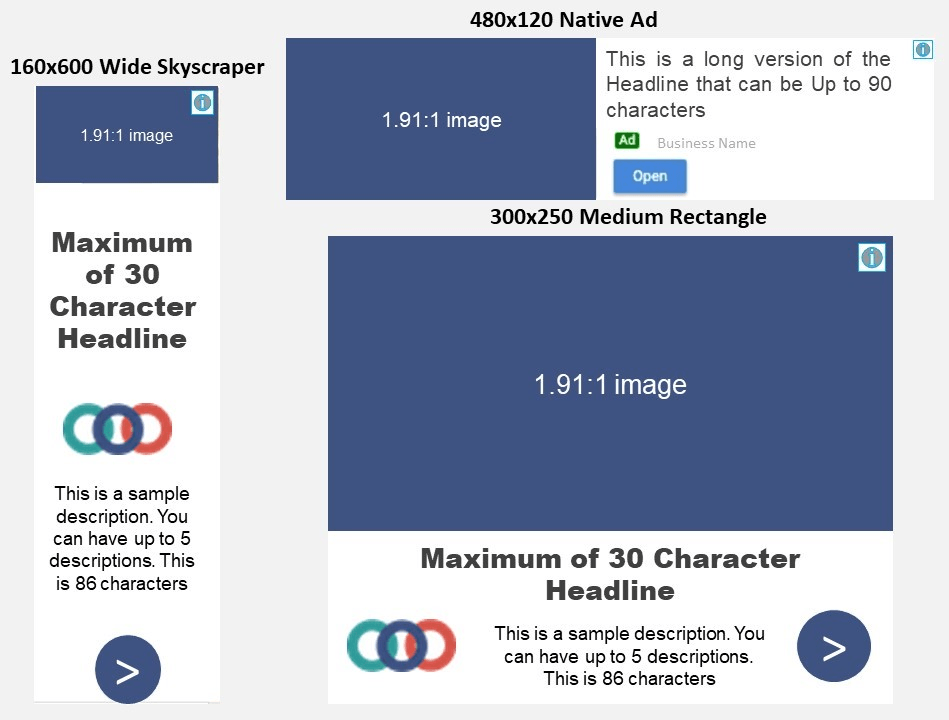

These sizes represent the majority of ad inventory and should be the cornerstone of your ad size choices.
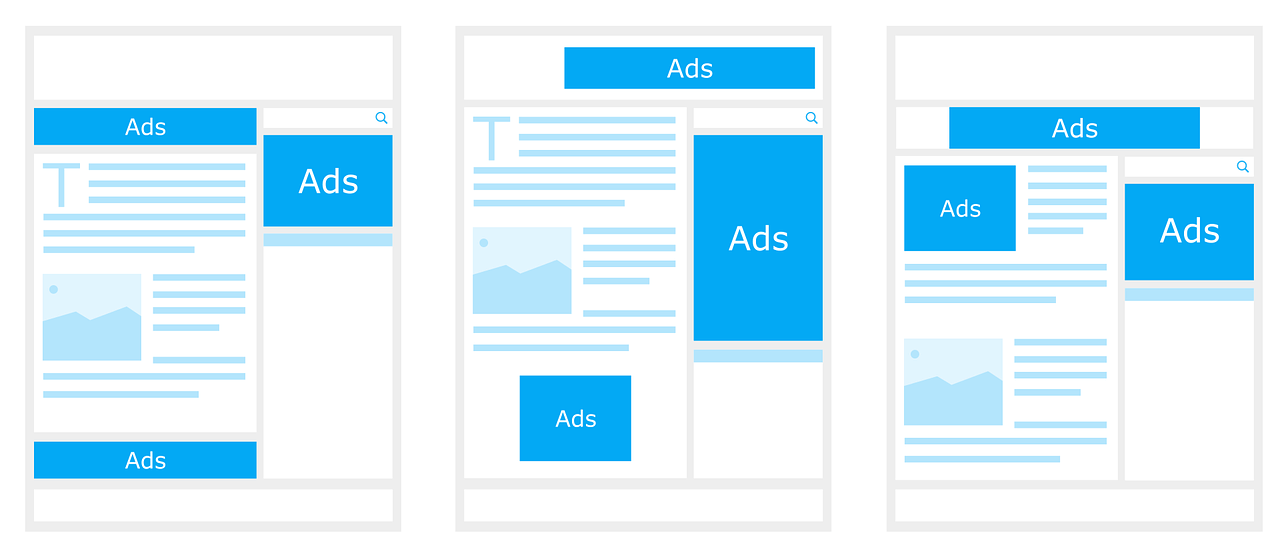
They are ideal for reaching a wide audience, as they can fit into various placements and screen sizes.
Components of Responsive Display Ads
Responsive Display Ads combine various text elements to effectively convey your message.
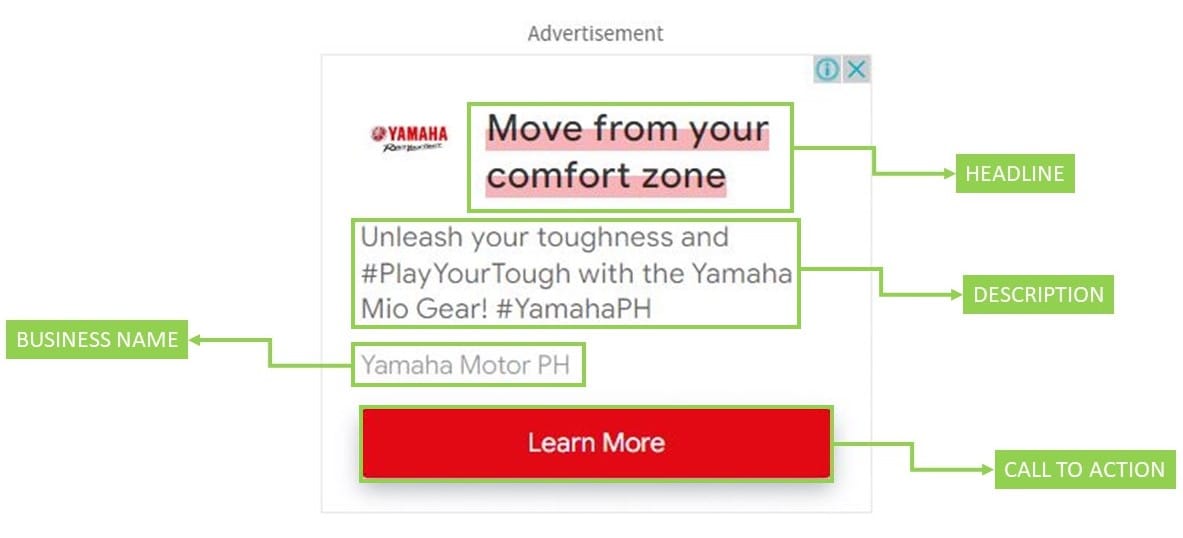
When creating your ad, consider including the following components:
Headline: This is the main title of your ad, with a maximum length of 30 characters. Choose a headline that grabs the reader's attention and highlights the most important aspect of your offering.
Description: This section supports your headline, elaborating on the details of your product or service. The description can be up to 90 characters, so make sure to keep it concise and informative.
Business name: Display your business name to create a sense of trust and familiarity among your audience.
Call-To-Action: Direct users toward your desired action, such as "Learn More," "Shop Now," or "Sign Up," so that interested users can easily visit your website and learn more about your offering.
In addition to text elements, Responsive Display Ads incorporate various visual components that help capture the audience's attention more effectively.

Here are the key visual elements for your ad:
Images: Select high-quality images that represent your product or service, as these visuals have a significant impact on user engagement. Aim for a landscape image with a ratio of 1.91:1, and a square image with a ratio of 1:1.
Logos: Incorporate your brand's logo to build recognition and establish a professional presence in your ad. For best results, use a logo with a transparent background and dimensions of 128 x 128 pixels or higher.
Landscape Image: This wide-format image can effectively showcase your product or service, making your ad more visually appealing. Opt for a landscape image with dimensions of 1200 x 628 pixels for optimal results.
Square Image: A square image adds an additional visual element to your ad, especially when viewed on mobile devices. Use a square image with dimensions of 1200 x 1200 pixels for the best outcome.
By combining these text and visual elements, you can create a compelling and effective Responsive Display Ad that successfully promotes your business and captures your target audience's attention.
Creation Process
To create a responsive display ad, you must start by uploading your assets. These include images, logos, and videos that will be used in the ads.
You should also prepare all the necessary headlines and descriptions to accompany the visuals.
Keep in mind that providing a variety of assets will allow Google's algorithm to create multiple combinations and find the best-performing ad layouts.
Here's a quick overview of the process:
Upload images and logos: Make sure you provide images in a wide range of shapes and sizes, including square, horizontal, or vertical formats. Supported file types include JPEG, PNG, and GIF.
Enter headlines and descriptions: Craft headlines and descriptions that capture your audience's attention and accurately represent your offer. You can provide up to five short headlines and a long headline, as well as up to five descriptions.
Review ad preview: Once you've uploaded your assets and written your copy, Google will automatically generate previews of ad combinations. You can see them on the ad creation page and make any necessary adjustments.
When uploading assets, take advantage of available formatting options such as bold text or bullet points to emphasize key points and improve readability.
Google responsive display ads can also scan your website and automatically extract assets like logos, images, and text.
This feature is particularly useful if you lack the resources to create your own assets or if you want to save time during the ad creation process.
To use this feature, simply enter your website URL when prompted. Google will then analyze your website, extract relevant assets, and create ad suggestions for you.
It's essential to review these suggestions carefully, and make adjustments or edits where necessary to ensure they align with your marketing objectives.
Conclusion
The flexibility of responsive display ads allows them to adapt to various device sizes and formats, ensuring your message reaches the right audience.
Incorporating automation into your campaign management helps to optimize the performance of your ads.
With responsive display ads, this process becomes even more efficient, as the system automatically selects the best-performing combination of ad assets.
As you explore the benefits of responsive display ads, consider the potential impact on your ROAS.
By investing in this innovative approach to display advertising, you're likely to see positive results in both engagement and conversion rates.
Remember, the key to success lies in continually refining and improving your ad assets.
Test different headlines, images, and videos to find the perfect combination that resonates with your target audience.
By doing so, you can position your brand as a leader in the industry and create a solid foundation for your display advertising efforts.
Click the link below to learn more about Google Ads so you can start growing your business.
SHARE


Subscribe now
Sign up for our newsletter to get the most interesting stories of the day straight to your inbox before everyone else
Privacy policy • Terms of service • | © 2025, ACT Marketing, LLC