
Maximize Your Ad Campaigns Using Google Adwords Tool
If you're looking to maximize the effectiveness of your online advertising campaigns, Google AdWords Tool is an absolute must-have.
With this platform, you can easily identify the most relevant and popular keywords for your target audience, giving you the power to optimize your ads and ensure they're reaching the right people at the right time. Pretty cool, right?
Google AdWords Tool also allows you to analyze keyword data and explore new opportunities for your campaigns.
This includes discovering high-traffic keywords with lower competition that can generate better results at a lower cost.
Plus, you can identify negative keywords that should be excluded from your campaigns to prevent wasting ad spend on irrelevant searches.
And that's not all! Google AdWords Tool also provides valuable insights into the performance of your existing advertisements.
You can use this data to make informed decisions on budget allocation and ad content adjustment, fine-tuning your campaigns and improving your return on investment significantly.
So, if you're not already using Google AdWords Tool to its full potential, it's time to start!
By doing so, you'll be able to take your online advertising campaigns to the next level and achieve even greater success.
Keyword Planning
Keyword Planner can be a powerful way to drive more targeted traffic to your website or advertisements.
It allows you to research relevant keywords that can help improve your ad's performance and organic search results. Here's how to use it effectively:
To begin, access the Google Keyword Planner through your Google Ads account.
Click on 'Tools & Settings' on the top right corner, and from the drop-down menu, select 'Keyword Planner'.
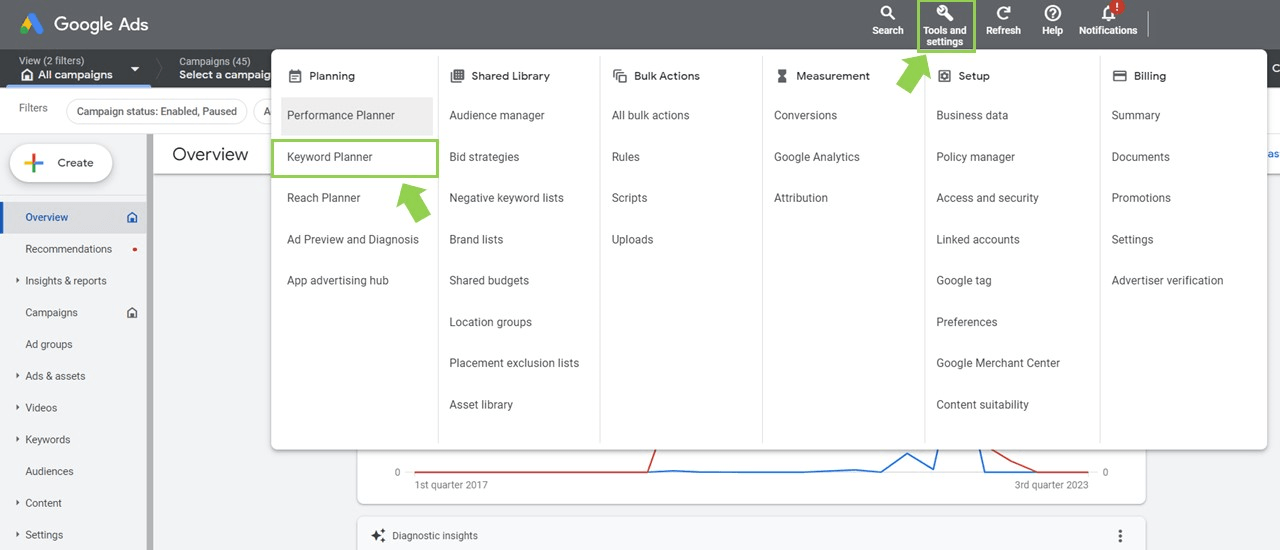
Once you're in the Keyword Planner, you'll see an option called "Discover new keywords".
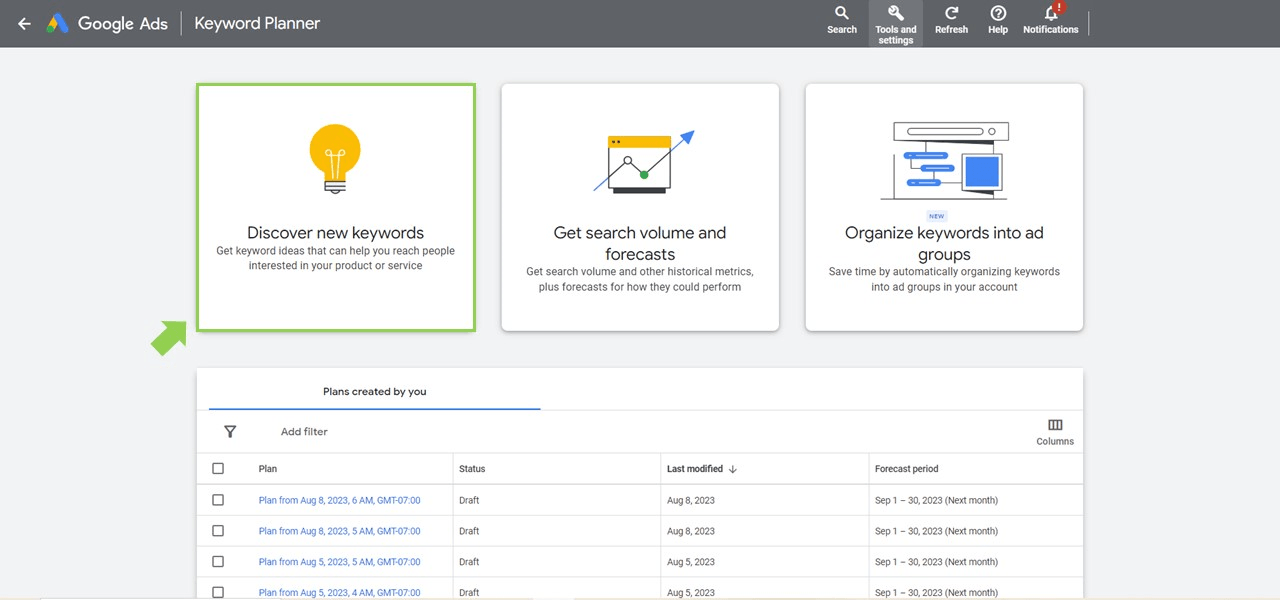
This feature allows you to enter words, phrases, or a URL related to your business to generate keyword ideas.
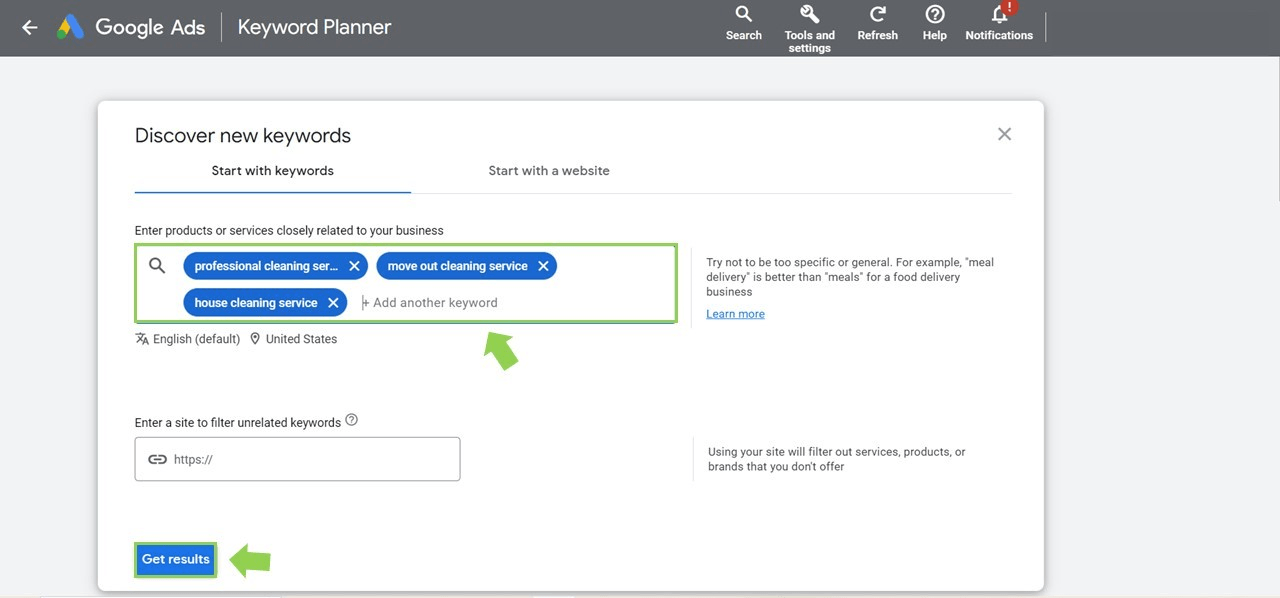
The next step involves defining your criteria for keyword selection.
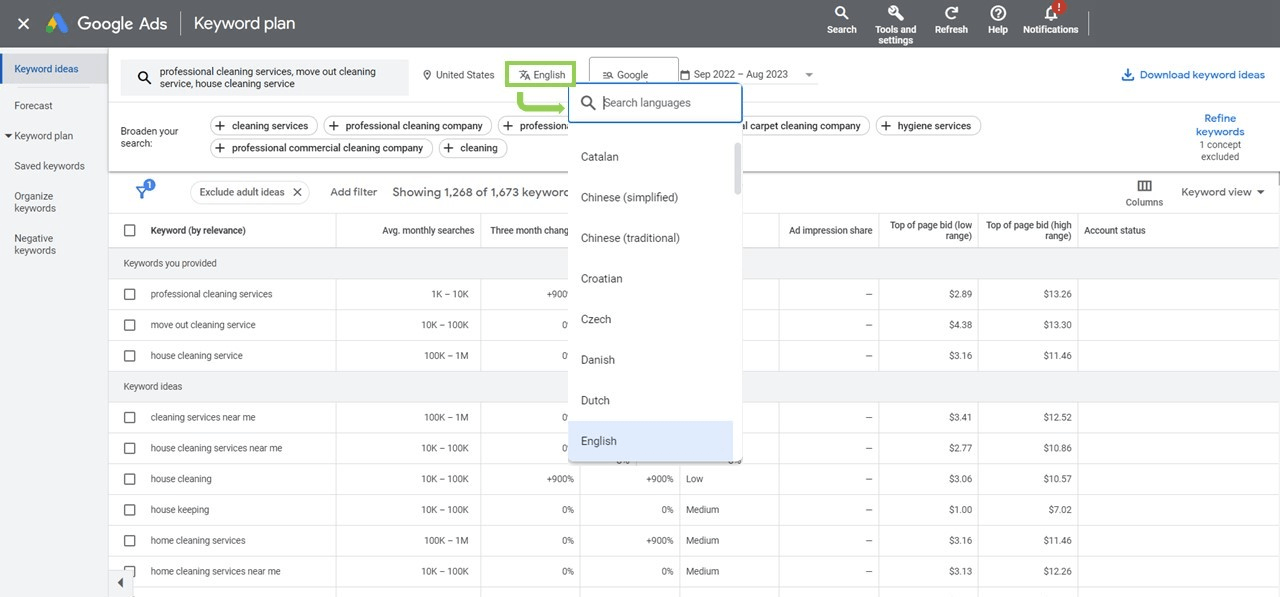
You can filter results based on geographic location, language, search networks, and date range.
This helps you target your audience more precisely.
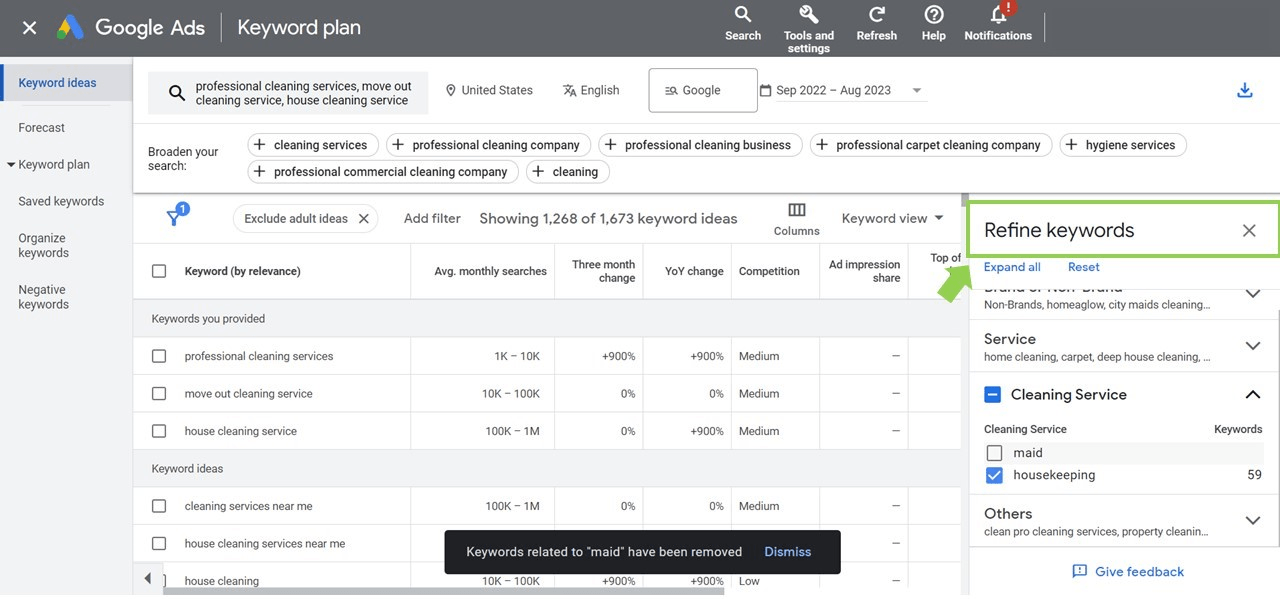
After you've defined your criteria, the Keyword Planner will provide you with data for the suggested keywords.
This includes average monthly searches, competition level, and a suggested bid if you plan to use them for PPC advertising.
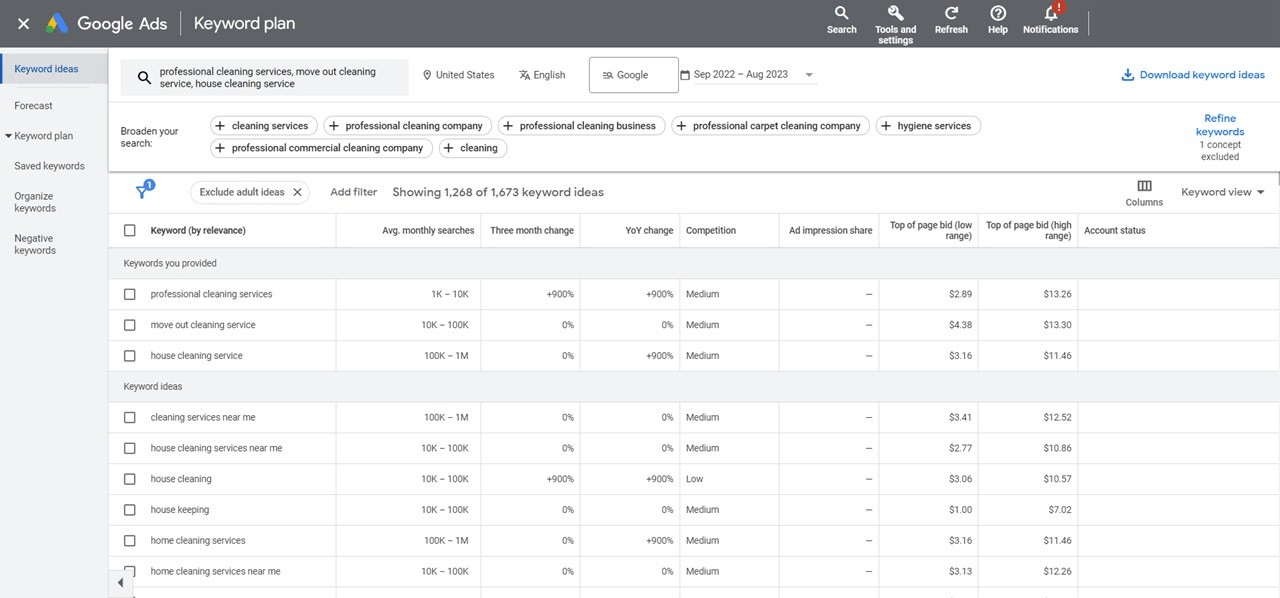
It's important to focus on quality keywords rather than just a large quantity.
Look for keywords with high relevance, good search volume, and lower competition. These are more likely to drive traffic to your site.
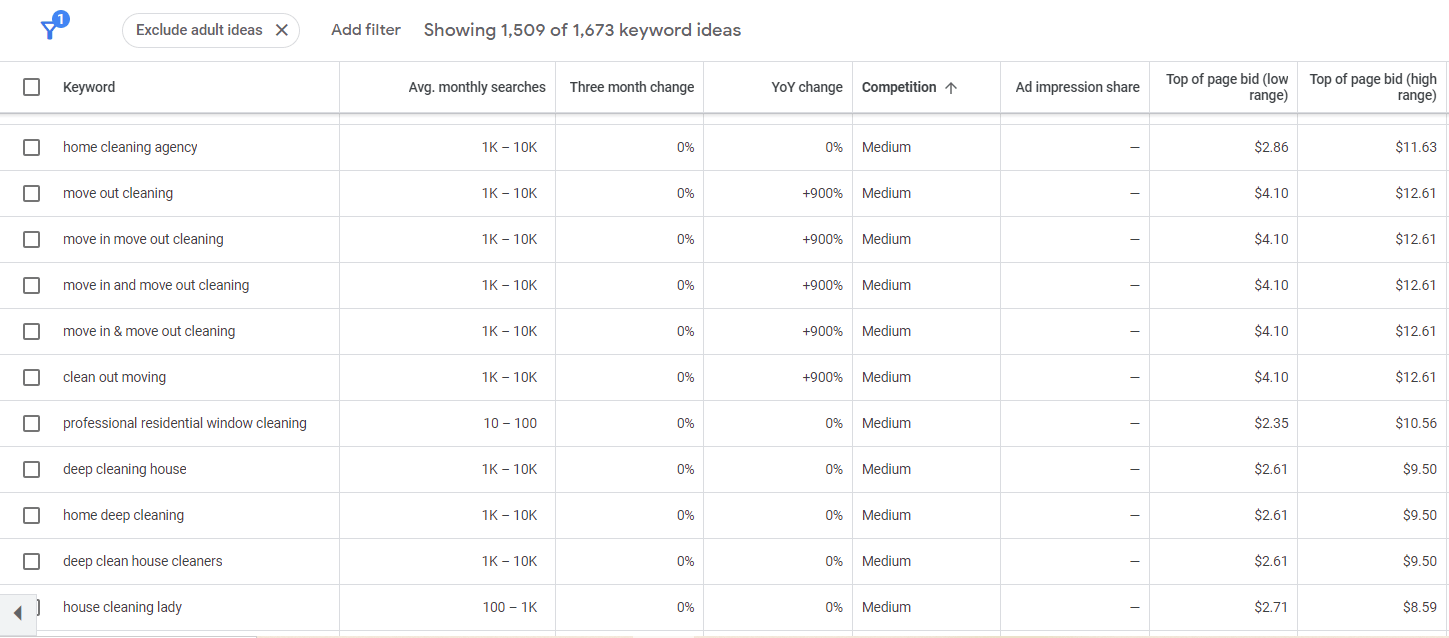
Lastly, apply your findings to your SEO and PPC strategies. Use the selected keywords in your website content, meta tags, ad campaigns, and any other place where visibility matters.
The key to success with Google AdWords is to select relevant keywords for your ads.
The Keyword Planner helps you find these by providing data on keyword search volume, cost per click (CPC), and competition.
These metrics will guide your decisions on which keywords to target in your campaigns.
When searching for keywords, consider the following:
Long-tail keywords: These are longer, more specific phrases that are less competitive but may have a higher conversion rate.
Local keywords: If you cater to a specific geographic area, include location-based terms in your keyword research.
Synonyms and variations: Include different synonyms and variations of your main keywords, as users might use alternative phrases when searching.
When using the Keyword Planner, always keep in mind the language and competition for your target audience.
If your website or product caters to a specific language or international market, be sure to adjust the settings in the tool accordingly.
This ensures that the results are more accurate for your target demographic.
Additionally, take note of the competition level for each keyword.
Going for highly competitive keywords may prove challenging, especially for new websites or small businesses on a budget.
Aim for a mix of low and medium competition keywords, as they can offer a good balance of visibility and attainability.
By following these guidelines and effectively using the Google Keyword Planner, you can develop a highly targeted keyword strategy that drives better results for your Google Ads campaigns and organic search ranking.
Remember that keyword research is an ongoing process, so regularly review and refine your strategy to maintain optimal performance.
Product and Service Promotion
A Google AdWords Search Campaign can promote your products and services by targeting potential customers who are searching for specific keywords related to your business.
To get started, create a campaign within your Google AdWords account and set your targeted keywords, bids, and budget.
You can focus on driving potential customers toward your website with engaging ad copy and relevant landing pages.
To maximize the effectiveness of your Search Campaign, monitor and optimize its performance based on data such as click-through rates (CTR) and conversion rates.
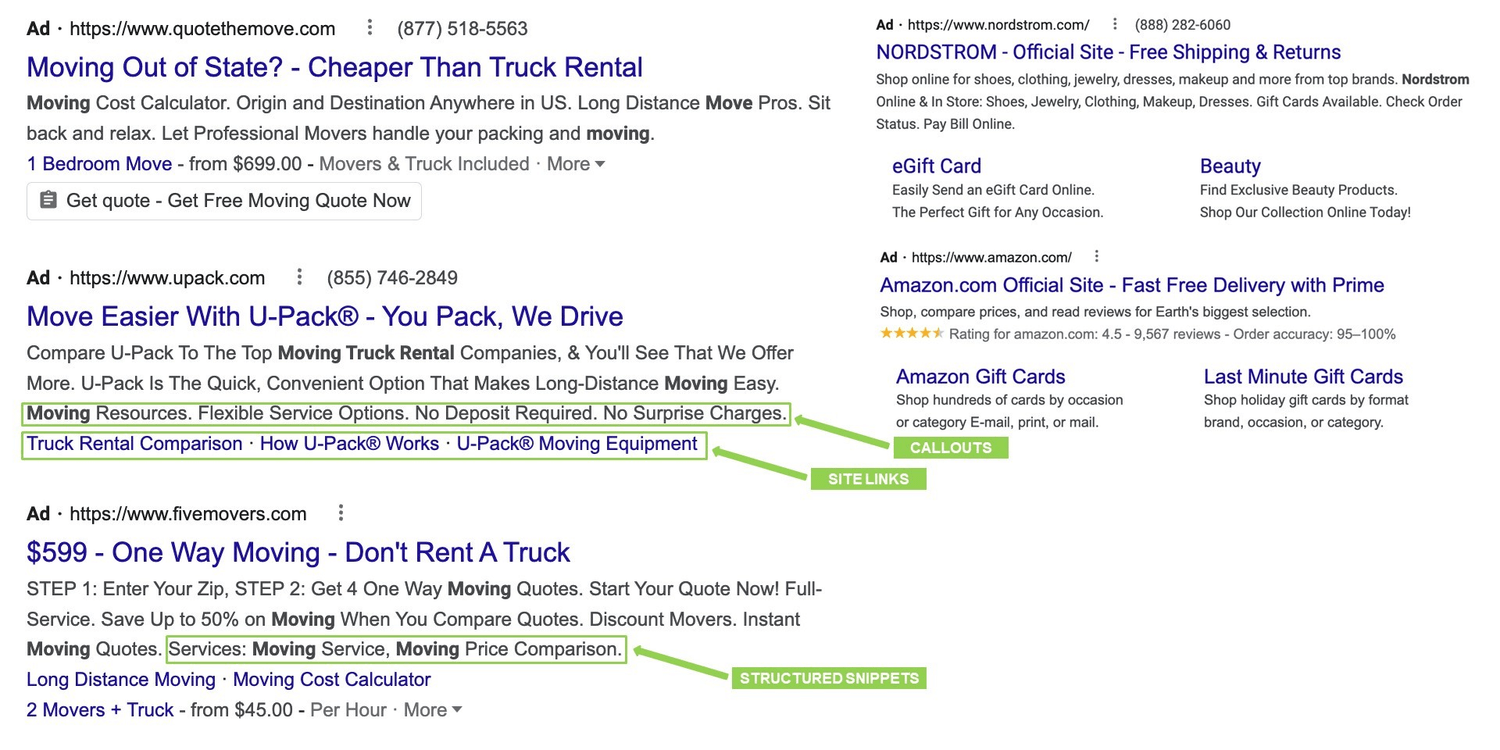
Consider using ad extensions, such as site links, callouts, and structured snippets to enhance your ads and provide additional information to users.
This can lead to increased visibility and click-through rates, improving the overall success of your campaign.
Utilizing YouTube and Google AdWords for Promotion
In addition to Search Campaigns, consider leveraging YouTube and Google AdWords to promote your products and services.
YouTube, being the second-largest search engine globally, offers a unique opportunity to engage with your target audience through video content.
There are several ad formats available on YouTube, including TrueView In-Stream ads, Bumper ads, and Discovery ads.
These ad formats allow you to reach viewers on YouTube and across the Google Display Network.
To create a YouTube Ad campaign, first, upload your video ad to your YouTube channel.
Then, link your YouTube channel to your Google AdWords account, and set up a video campaign with your targeting preferences, budget, and ad formats.
Make sure to choose the appropriate targeting options, such as demographics, interests, and placements, to ensure your video ad is shown to the right audience.
Tracking metrics like views, watch time, and conversions will help you monitor your campaign's success and make data-driven decisions for future optimizations.
Remember, using a blend of Google AdWords Search Campaigns and YouTube advertising can help you reach a wider audience and improve your overall marketing strategy to promote your products and services effectively.
Conclusion
Google AdWords offers an array of tools to help your businesses grow, be it through search campaigns, YouTube, or other methods.
It’s an invaluable tool to consider when planning a promotion strategy - the ability to reach new potential customers and target those already interested in your product or service.
Also, with many user-friendly features like keyword planning and its easy-to-use interface, everyone can quickly get up and running at what can sometimes seem like a daunting task.
So if you’re looking for a way to spread the word about your business, consider giving Google AdWords a try.
Click the link below to learn more about Google Ads so you can start growing your business today!
SHARE


Subscribe now
Sign up for our newsletter to get the most interesting stories of the day straight to your inbox before everyone else
Privacy policy • Terms of service • | © 2025, ACT Marketing, LLC