
Google Ads Remarketing: Create Highly Targeted Campaigns That Convert
Remarketing allows you to reconnect with potential customers who have previously visited your website or interacted with your online content.
By leveraging the power of Google Ads, you can target these users with tailored ads designed to draw them back into your sales funnel and increase your conversion rates.
To make the most of Google Ads Remarketing, you'll need to understand the basics, such as how to create effective remarketing lists, design compelling ads, and optimize your campaigns for maximum results.
By mastering these essential elements, you'll be well-equipped to leverage the full potential of remarketing and unlock new opportunities for your business.
It's important to remember, however, that remarketing is just one component of a comprehensive digital marketing strategy.
To truly excel in this competitive landscape, you'll need to continually refine your approach and stay up-to-date on the latest trends and best practices in the industry.
Embrace the power of remarketing Google Ads with confidence, and watch as your online presence and conversions grow.
How Google Ads Remarketing Works?
So, let's say you have a website or an app that you use to sell products or services.
You want to reach people who have shown interest in your offerings, but who may not have made a purchase or taken the desired action. That's where Google Ads Remarketing comes in.
STEP 1: When someone visits your website or app, Google Ads places a cookie on their device. This cookie tracks their activity and allows you to show them targeted ads later on.

STEP 2: If the user leaves your website or app without making a purchase or taking the desired action, they may see your ads on other websites, apps, or YouTube videos that are part of the Google Display Network.

STEP 3: Later on, as the user browses the web, they may see your ads on other websites, apps, or YouTube videos that are part of the Google Display Network.
These ads are specifically targeted to users who have previously interacted with your website, app, or YouTube channel.
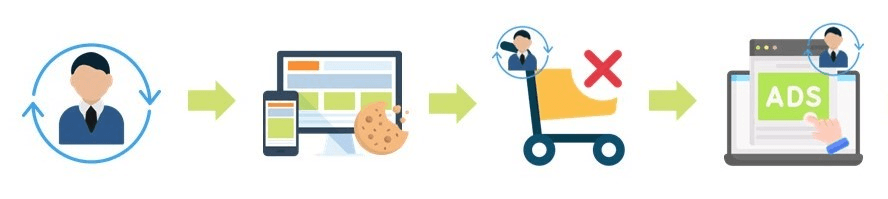
STEP 4: The user clicks on your ad and returns to your website, app, or YouTube channel, where they may be more likely to take the desired action.

The idea is to re-engage users who have already shown interest in your products or services.
By showing them targeted ads later on, you can remind them of what they were looking at and encourage them to come back and take the desired action.
You can use Google Ads Remarketing in a variety of ways.
For example, you can create remarketing campaigns to target users who have abandoned their shopping carts, users who have visited specific pages on your website, or users who have downloaded your app but haven't used it in a while.
Remarketing ads can be displayed in a variety of formats, including display ads, text ads, and video ads.
You can customize your ads with different messaging and creative to better target your audience.
Why Use Remarketing?
Here are some of the benefits of using Google Ads Remarketing:
Audience segmentation: With remarketing, you can segment your audience based on their browsing behavior, allowing you to create highly targeted campaigns.
Brand exposure: Remarketing serves as a reminder for potential customers who have left your site, helping to maintain your brand's presence in their minds.
Increased conversion rates: Remarketing campaigns often have higher conversion rates than traditional display ads, as users who have already shown interest in your products or services are more likely to convert.
Cost-effective: You can set up bidding strategies that focus on clicks or conversions, ensuring you're spending your budget efficiently to get the best results.
Creation of Remarketing Lists
To set up Google Ads Remarketing, you first need to create remarketing lists.
These lists are groups of website visitors or app users that you want to target with specific ads. To create a remarketing list, follow these steps:
Step 1: Sign in to your Google Ads account and click on the "Tools" icon then go to the “Shared Library” option.
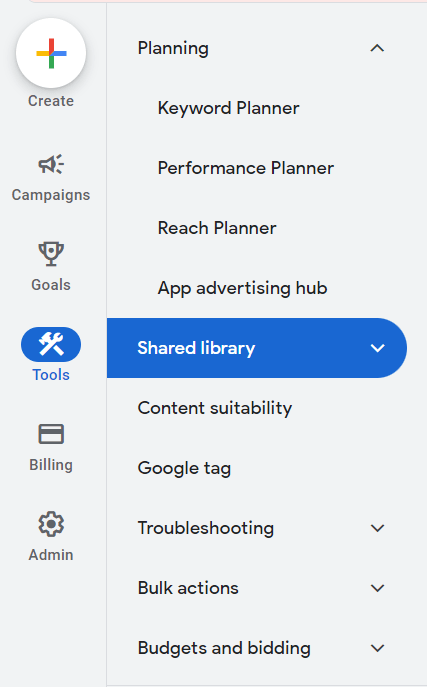
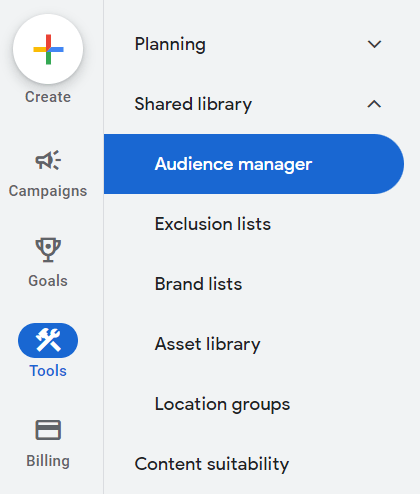
Step 2: Select "Audience Manager" from the drop-down menu.
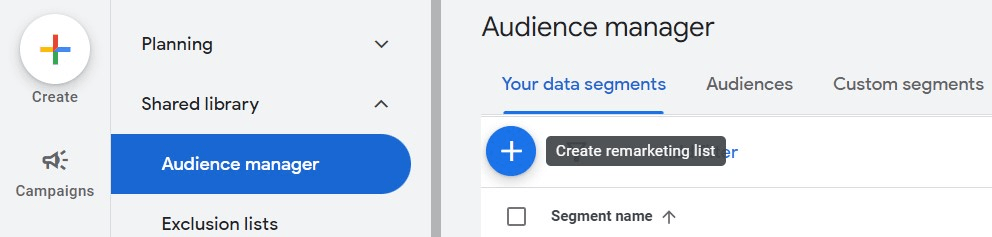
Step 3: Click +Remarketing List to create a new list.
Step 4: Choose your list type and set the specific criteria for the audience you want to target.
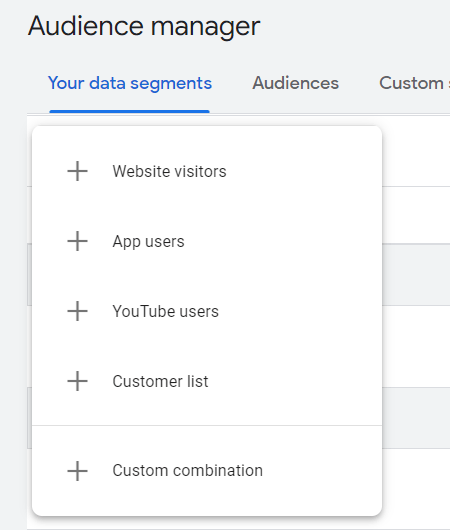
Step 5: Assign a unique name for your list and select a membership duration.
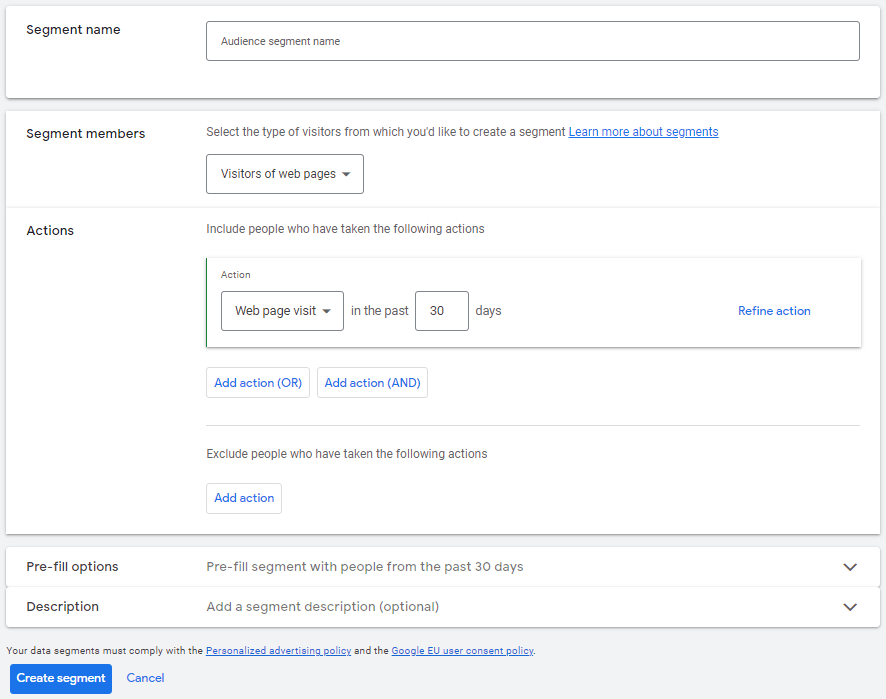
Step 6: Click the Create segment button to save your new remarketing list.
Once you've created your remarketing list, you can use it to create highly targeted campaigns that are more likely to convert.
For example, you can create a campaign that targets users who have abandoned their shopping cart, showing them ads that highlight the benefits of completing their purchase.
You can also create campaigns that target users who have visited specific pages on your website, showing them ads that are highly relevant to their interests.
Frequency Capping
To achieve optimal results with your remarketing campaigns, it is essential to set frequency capping.
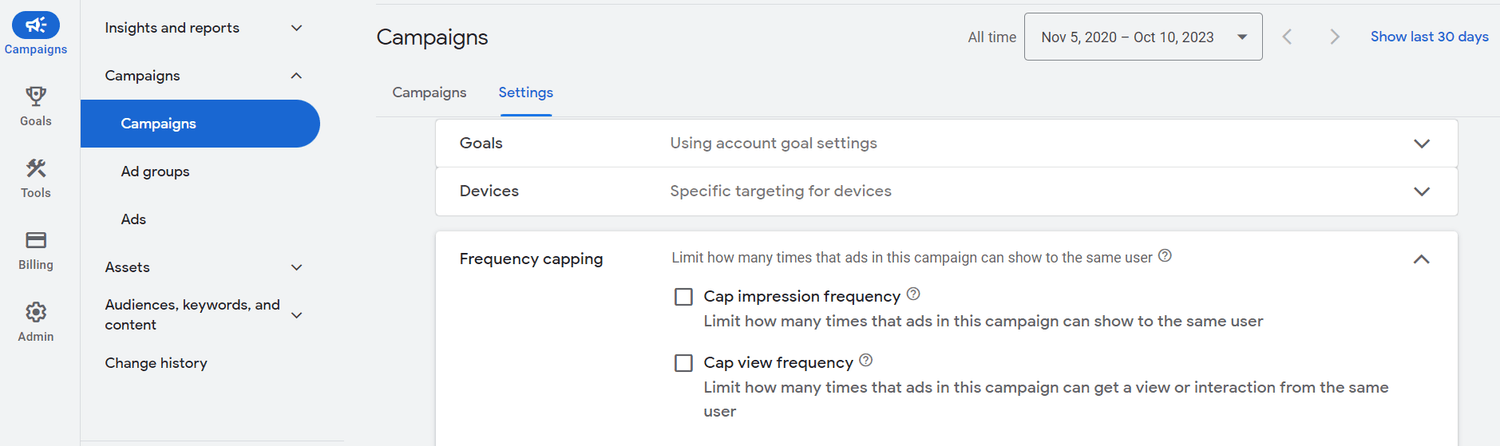
Frequency capping allows you to limit the number of times your ads are shown to a user within a specified time frame.
By doing so, you can prevent ad fatigue and ensure that your audience isn't overwhelmed by your ads.
To set up frequency capping in Google Ads, follow these steps:
Step 1: Choose the campaign where you want to apply frequency capping.
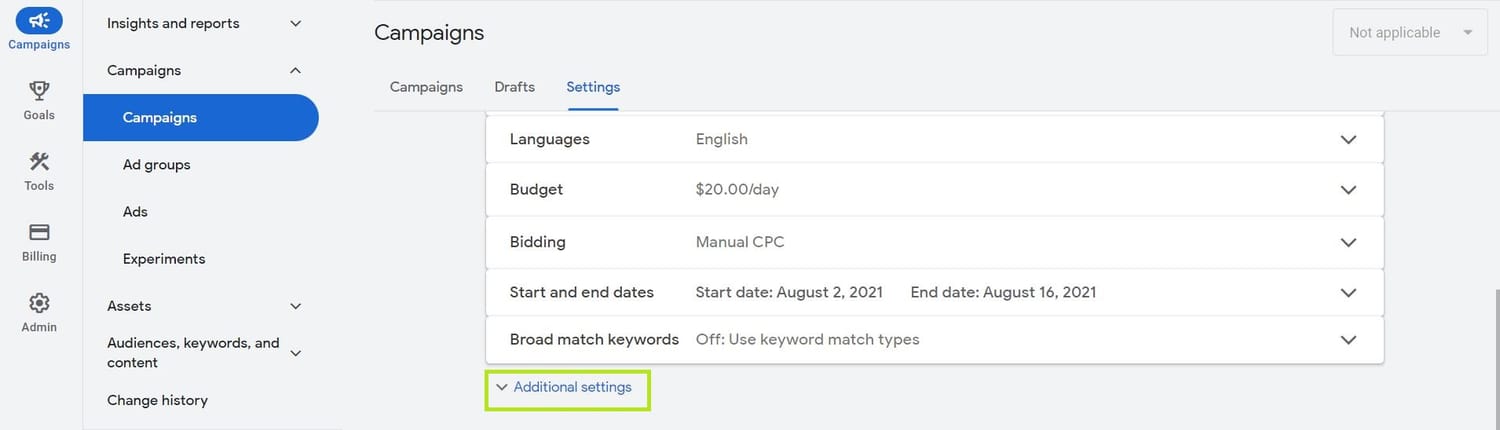
Step 2: Go to the Settings tab in your Google Ads account.
Step 3: Click on Additional setting
Step 4: Expand the Frequency capping section and select the desired values for impressions per user.
Remember to find the right balance when setting a cap.
If the cap is too low, your audience might not respond to your ads as desired.
If the cap is too high, you risk wasting your ad budget with overexposure.
Using geo-targeting, you can customize your remarketing ads to reach potential customers in specific locations.
This could be based on the user's geolocation, language, or even browsing behavior.
By targeting users in specific areas, you can tailor your message to resonate with your target audience and deliver better results.
Here are some examples of how geo-targeting can help you create a more effective remarketing campaign:
Target users in specific countries or regions.
Exclude certain locations where your product or service may not be relevant.
Bid higher or lower for users from particular locations.
Follow these steps to set up geo-targeting in Google Ads:
Step 1: Choose the campaign where you want to apply geo-targeting.
Step 2: Go to the Settings tab.
Step 3: Scroll down to Locations.
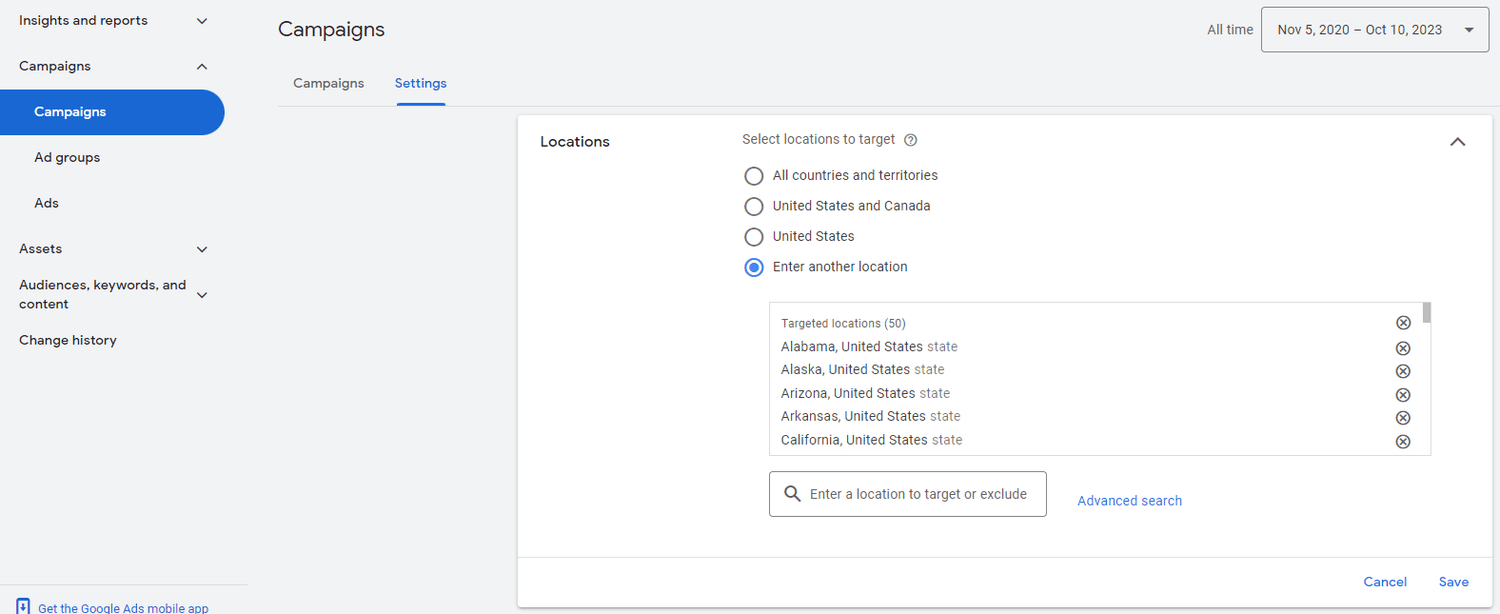
Step 4: Add the desired locations to include or exclude from your campaign.
Day parting, also known as ad scheduling, is the practice of customizing the delivery of your ads based on user preferences and patterns.
You can use day parting to ensure your ads are displayed at the most ideal time and day, maximizing the chances of engagement.
To analyze user browsing patterns and identify the most effective days and times for your remarketing campaign, utilize the "Hour of day" and "Day of week" performance reports available in Google Ads reports.
When you're ready to schedule your ads, follow these steps:
Step 1: In your Google Ads account, click Campaigns icon.
Step 2: Click the Audiences, keywords, and content drop-down.
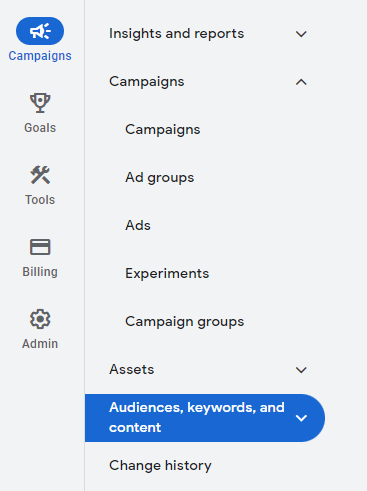
Step 3: Click on Ad schedule.
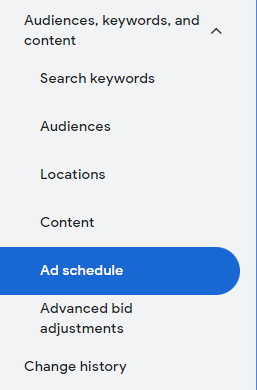
Step 4: Select a campaign and then click the pencil icon to create an ad schedule.
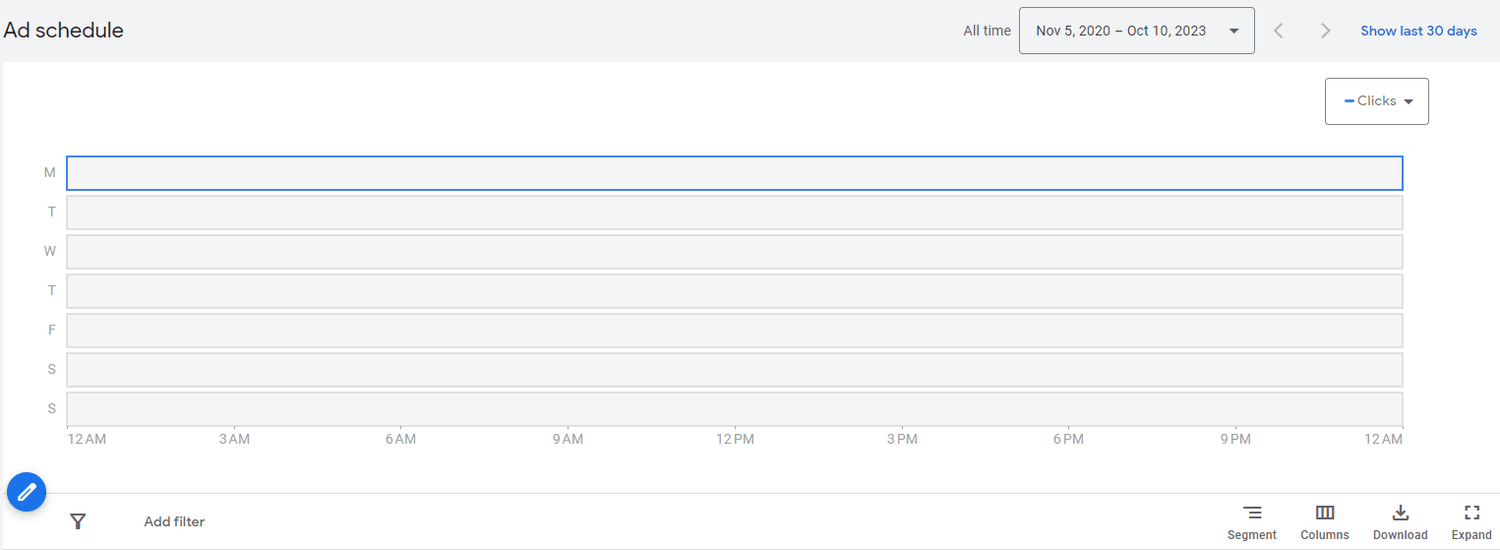
Step 5: Set the timeframes for your ads to be displayed.
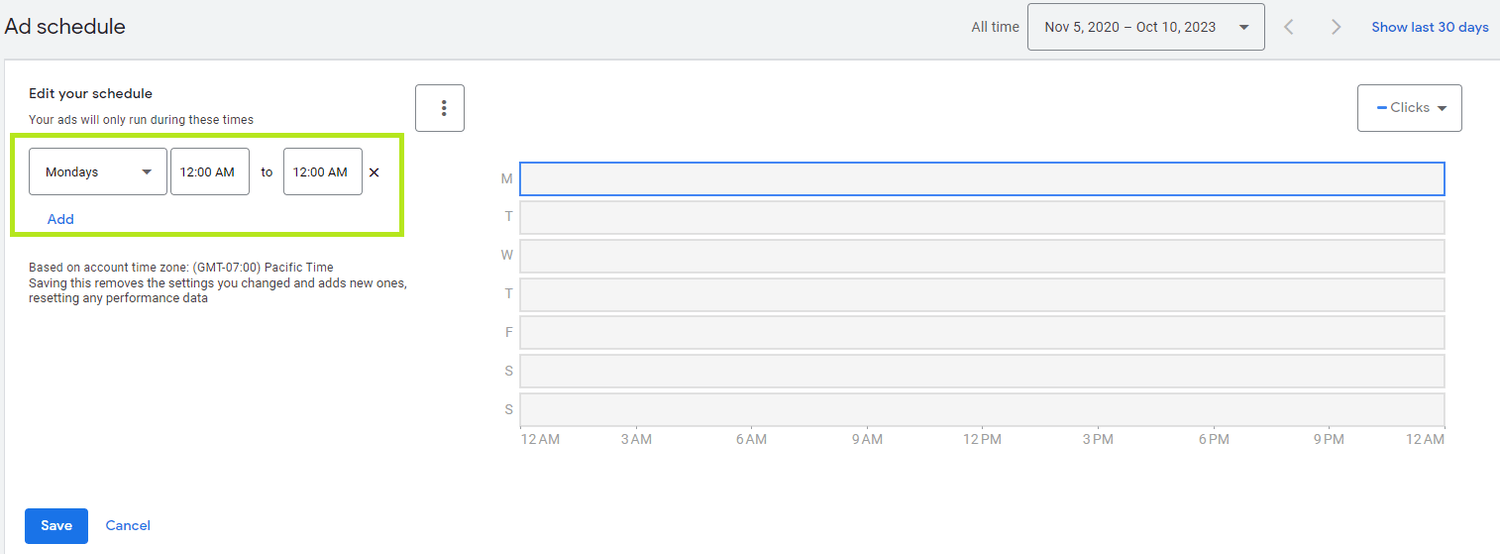
Keep in mind that day parting should be adjusted according to your campaign goals and audience's behavior.
Continually analyze your performance reports and adjust your schedule for optimal results.
Conclusion
Google Ads Remarketing is a powerful tool that allows businesses to re-engage users who have already shown interest in their products or services.
By placing a cookie on users' devices and tracking their activity, Google Ads Remarketing allows businesses to show targeted ads to users who have visited their website or app but haven't yet taken the desired action.
With audience segmentation, increased brand exposure, higher conversion rates, and cost-effectiveness, there are many reasons why businesses should use Google Ads Remarketing.
Creating a remarketing list is a crucial step in the process, and businesses should consider different remarketing strategies to create highly targeted campaigns that are more likely to convert.
Overall, Google Ads Remarketing is a powerful tool for businesses looking to drive conversions and increase their ROI.
Click the link below to learn more about Google Ads so you can start growing your business.
SHARE


Subscribe now
Sign up for our newsletter to get the most interesting stories of the day straight to your inbox before everyone else
Privacy policy • Terms of service • | © 2025, ACT Marketing, LLC